Website change monitoring:Know what changed, and whether it matters.
ChangeGuard checks the web pages your work depends on, from rules and contracts to prices and competitors. When one changes, you see the words that changed, a short summary, and how much it matters.
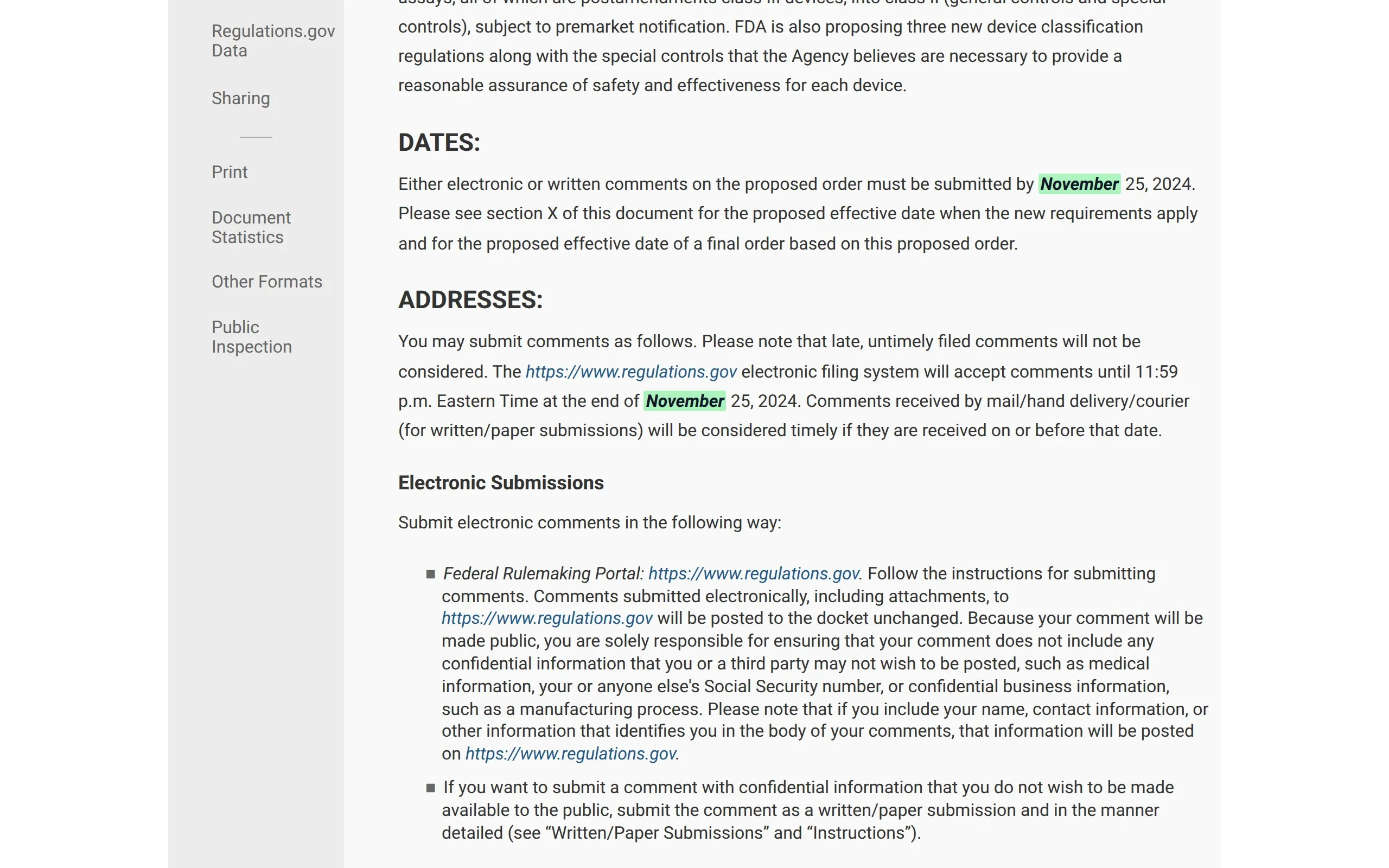
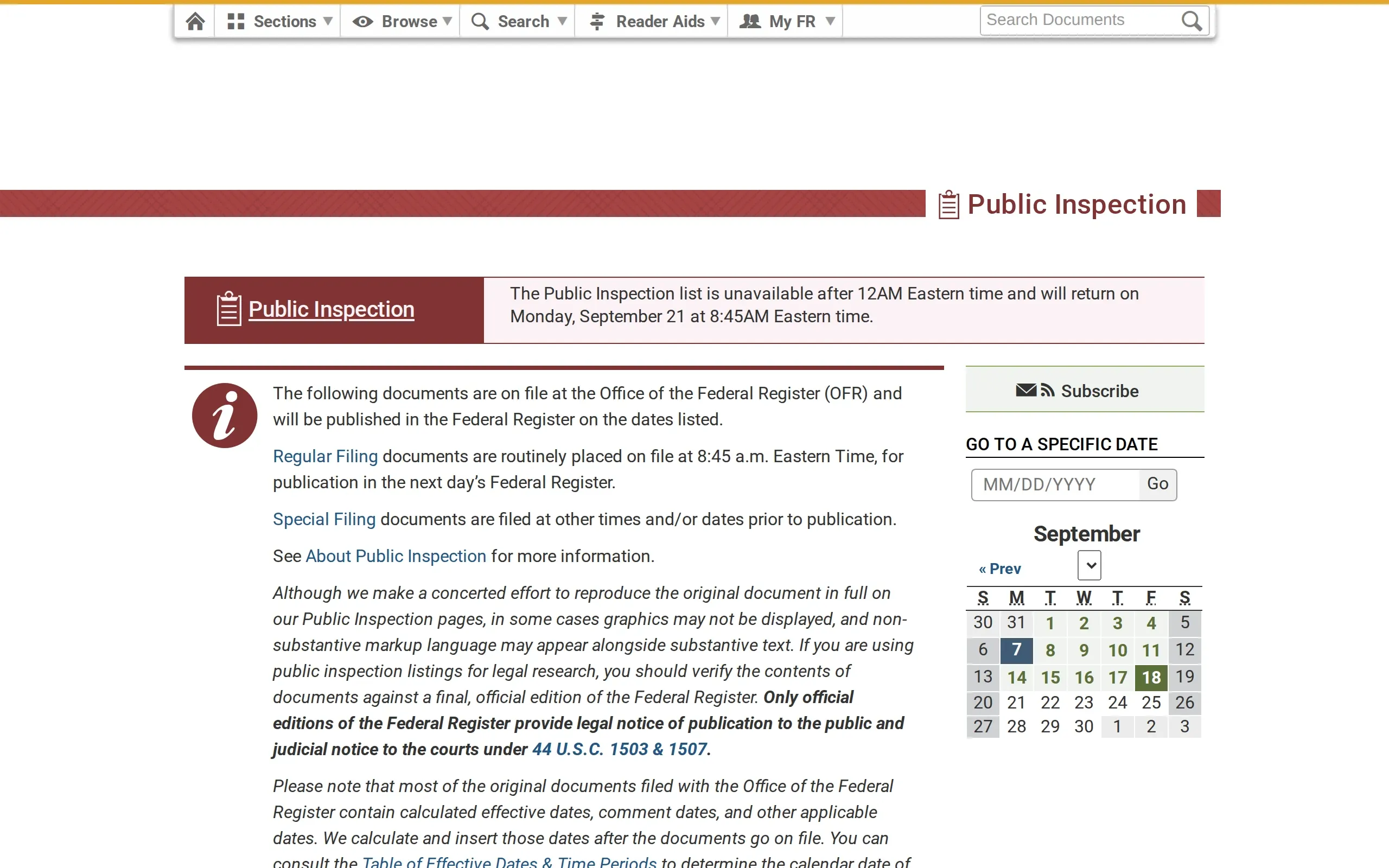
Microbiology Devices; Reclassification of Hepatitis B Virus Assay Devices
Comments must be submitted by October November 25, 2024
Likely substantial Comment period extended by a month.Checked Sep 20, 2026
Checked on your schedule
Every page about once a day, and key pages as often as every hour from Starter up.
Words, look and documents
Every check compares the text and the screenshot, and looks for new PDF, Word and Excel documents the page links to.
Summaries written on our own systems
Your pages are not sent to outside AI companies.
No charge per person
From Team up, your whole team can log in for the same price.
How it works
Four steps, then it runs on its own.
1
Add the pages
Paste the web addresses, or upload a spreadsheet. Group them into sets: one for each supplier, regulator or competitor.
2
Decide what matters
Choose how often to check: every few hours, daily, weekly or monthly, at a time that suits you. Click the parts of a page to ignore, or name the words to watch for.
3
ChangeGuard checks and compares
Each check saves the page’s text and a screenshot, then compares them with the last version. It also spots any new PDF, Word document or Excel spreadsheet the page links to. A change that is only formatting is rated minor, and anything below the floor you set stays quiet.
4
Read what changed, decide, move on
You get an email that quotes the change: one per change, one per check, or a daily or weekly round-up. Each change comes with a short summary and a rating of how much it matters, and past versions are kept.
See a change
See exactly what changed. Drag to try it.
The old and new versions of a page, side by side, with the differences highlighted and a short note on what they add up to. Text that only moved is shown as moved, not as deleted and typed again. Drag the divider, or use the arrow keys.
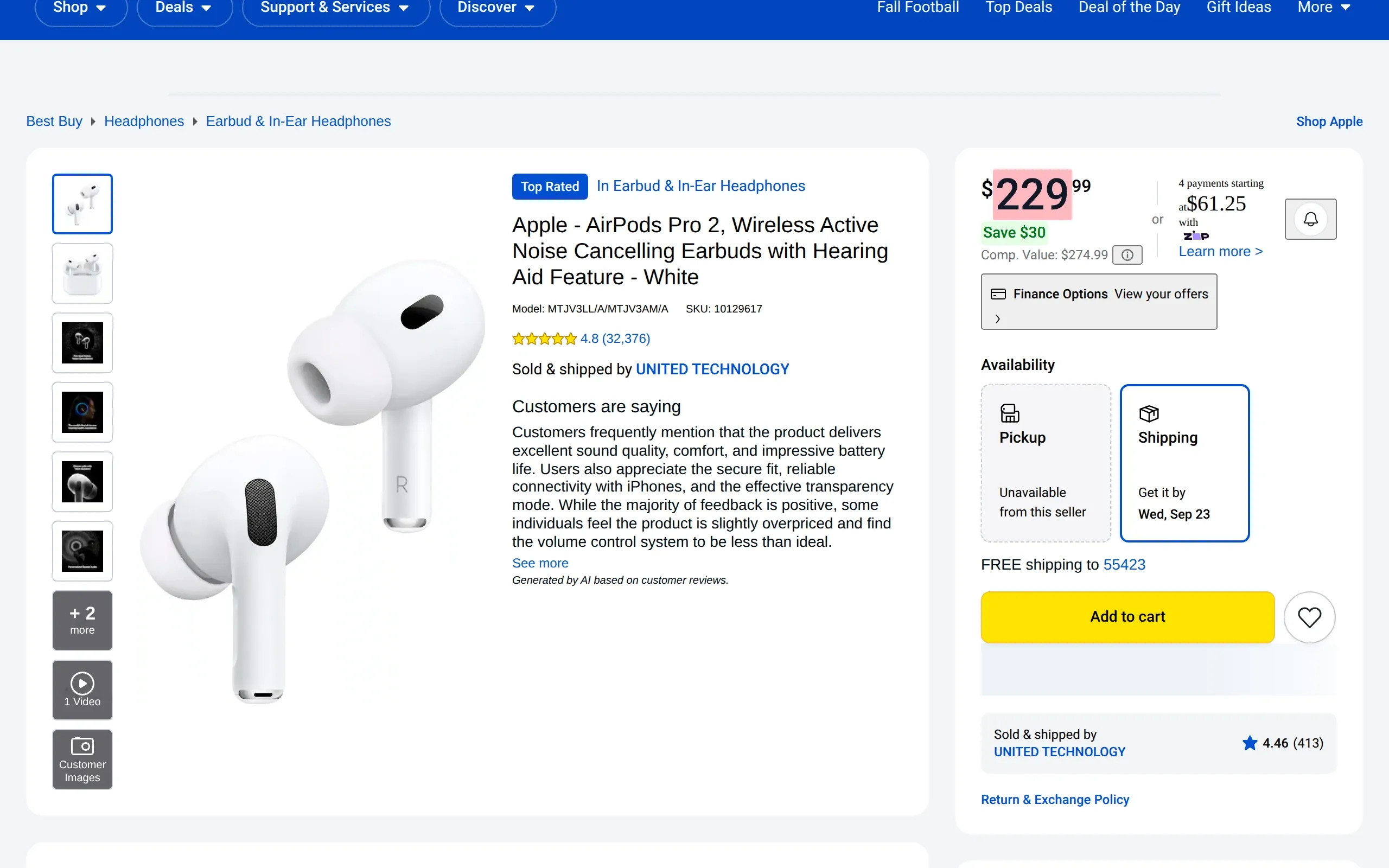
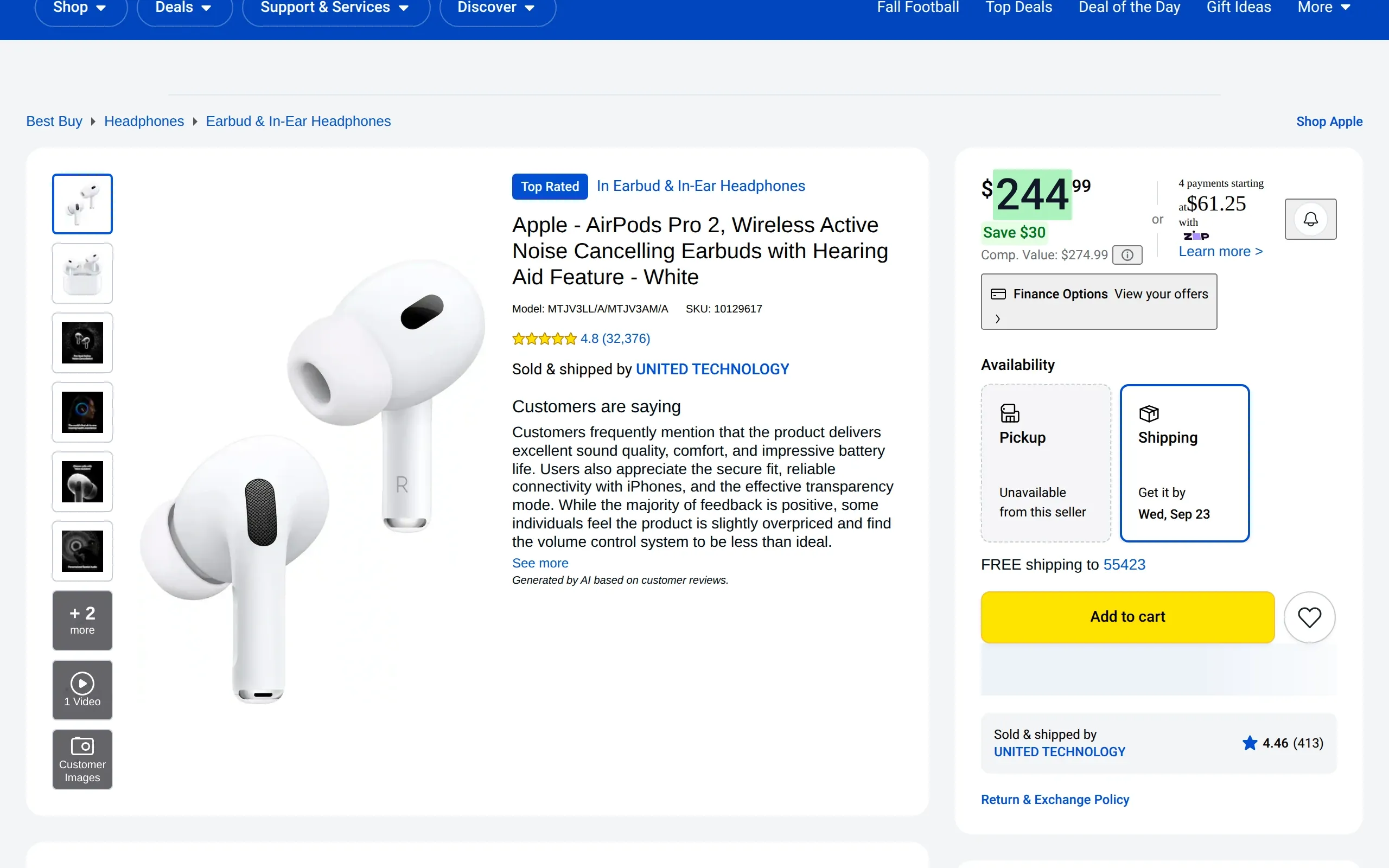
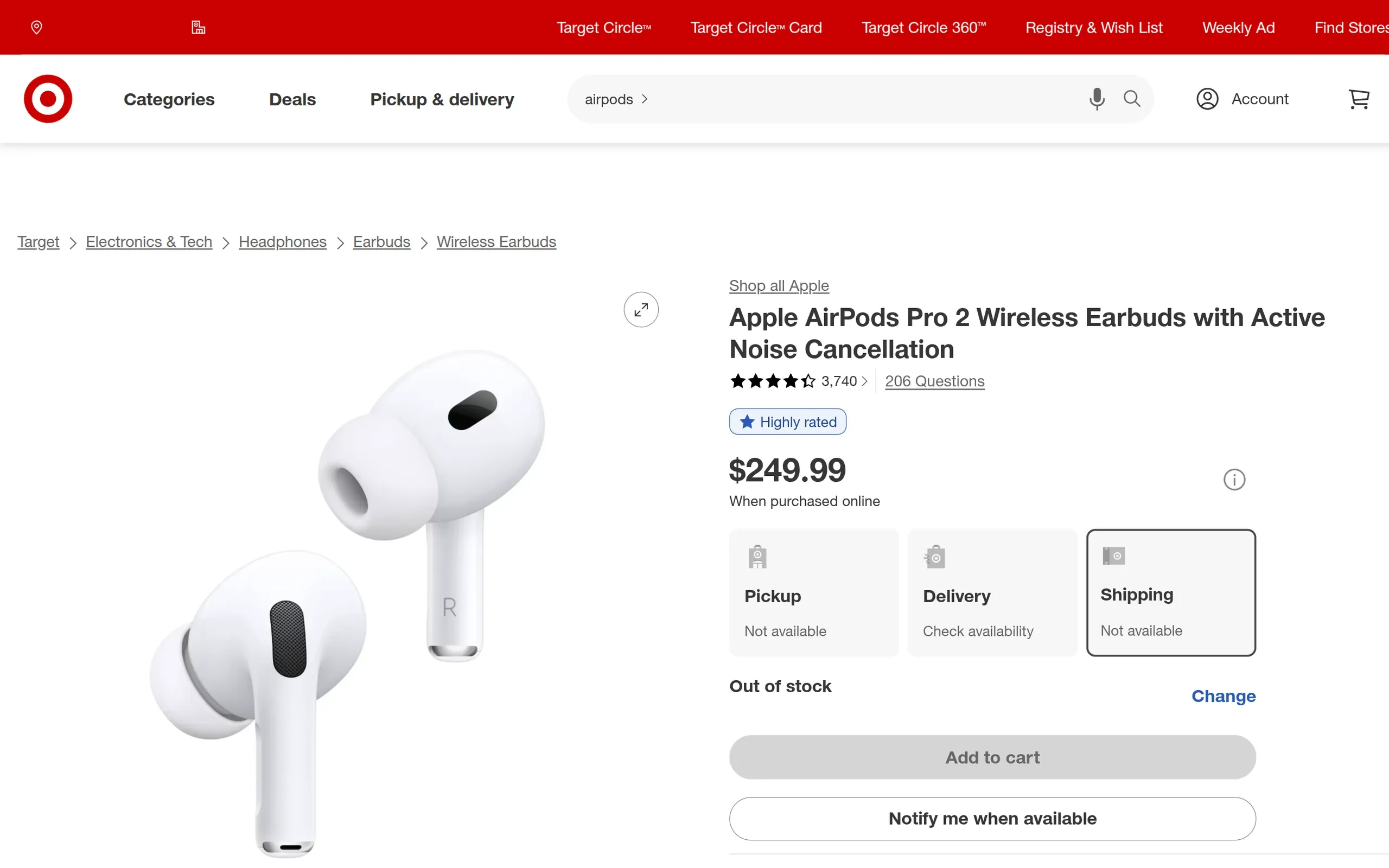
Best Buy · Apple AirPods Pro 2 (USB-C)
Price up from $229.99 to $244.99.
Match it, undercut it or hold your price: you can only choose if you know.
How ChangeGuard helped
Screenshots. The page is compared as a screenshot too, product photo included, so a new image or a redesigned listing is caught even when no word changes.
Comparison. Only the price is marked: the rest of the listing, reviews and offers included, stayed the same.
AI summary. Gives both prices, so you can decide whether to follow without visiting the page.
bestbuy.com · Apple AirPods Pro 2 (USB-C)
Current · Sep 20, 2026Previous · earlier version
AI summaryLikely substantial
Price
$229.99→ $244.99
The price rose from $229.99 to $244.99. The rest of the listing did not change.
The price rose from $229.99 to $244.99. The rest of the listing did not change. Drag the divider to see the previous version.
Sees the page the way you do, and knows when a paragraph only moved
Compares the screenshots too, so a change in the layout is caught even when the words stayed the same
A news page that gained two posts shows two new posts, not a rewrite of the old ones
Past versions are kept, so you can compare today’s page with an earlier one
For compliance and legal teams
The changes that matter, marked on the page.
It marks the change on the page, says what it means, and lists the new documents.
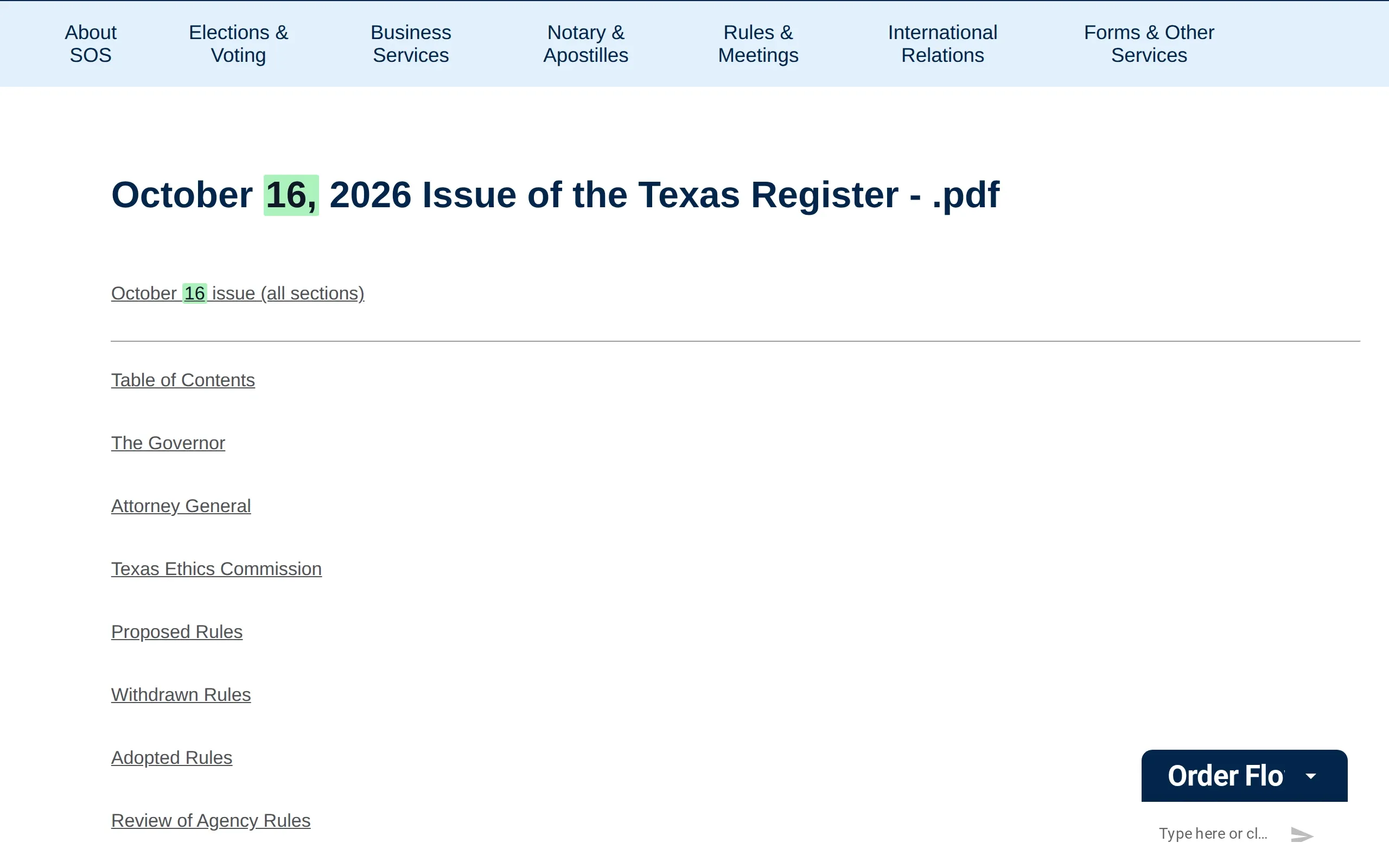
Texas Secretary of State · Texas Register · Current issue (PDF)
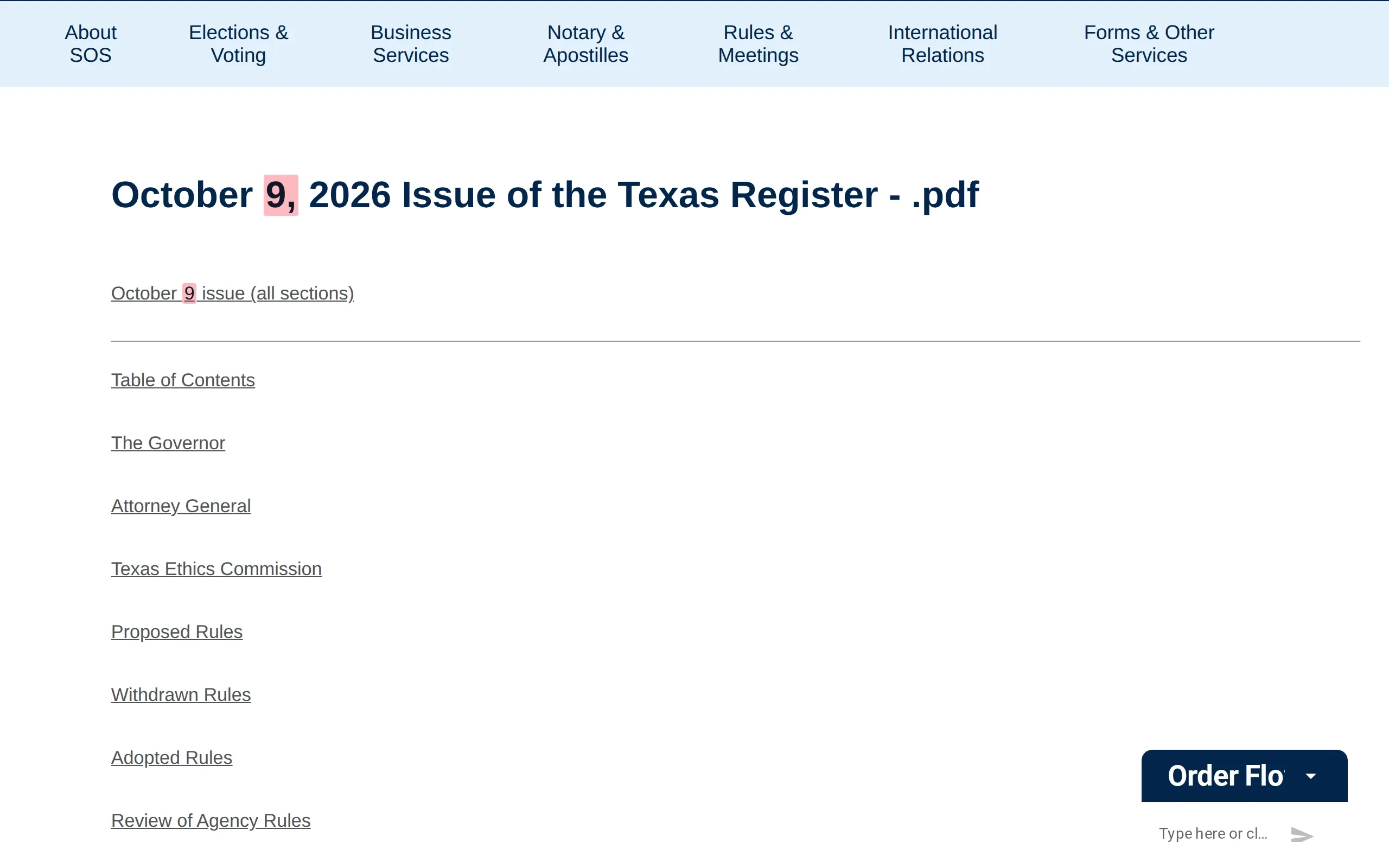
A new issue of the Texas Register, in ten PDFs.
State agencies propose their rules in it, and the time to comment counts from the issue's date.
How ChangeGuard helped
Documents. The ten new PDFs, the whole issue and each of its sections, are listed by title with the day they were first seen, so you can open Proposed Rules straight from the list.
Comparison. The heading and the first link change each week, and both are marked, so a new issue shows at a glance on a page that otherwise looks the same.
AI summary. Gives the issue's date and the sections it holds, so you know a new batch of proposed rules is waiting.
sos.state.tx.us · Texas Register · Current issue (PDF)
Current · Oct 15, 2026Previous · earlier version
AI summaryLikely substantialnew document
Current issue:
October 9, 2026→ October 16, 2026
The October 16, 2026 issue of the Texas Register was posted: ten PDFs, the whole issue and each of its sections, among them Proposed Rules and Adopted Rules. The October 9 files are no longer listed.
10 new PDFs
PDFOctober 16 issue (all sections)first seen Oct 15, 2026
PDFProposed Rulesfirst seen Oct 15, 2026
PDFAdopted Rulesfirst seen Oct 15, 2026
+7 more
The October 16, 2026 issue of the Texas Register was posted: ten PDFs, the whole issue and each of its sections, among them Proposed Rules and Adopted Rules. The October 9 files are no longer listed. Drag the divider to see the previous version.
Stripe · Stripe Services Agreement
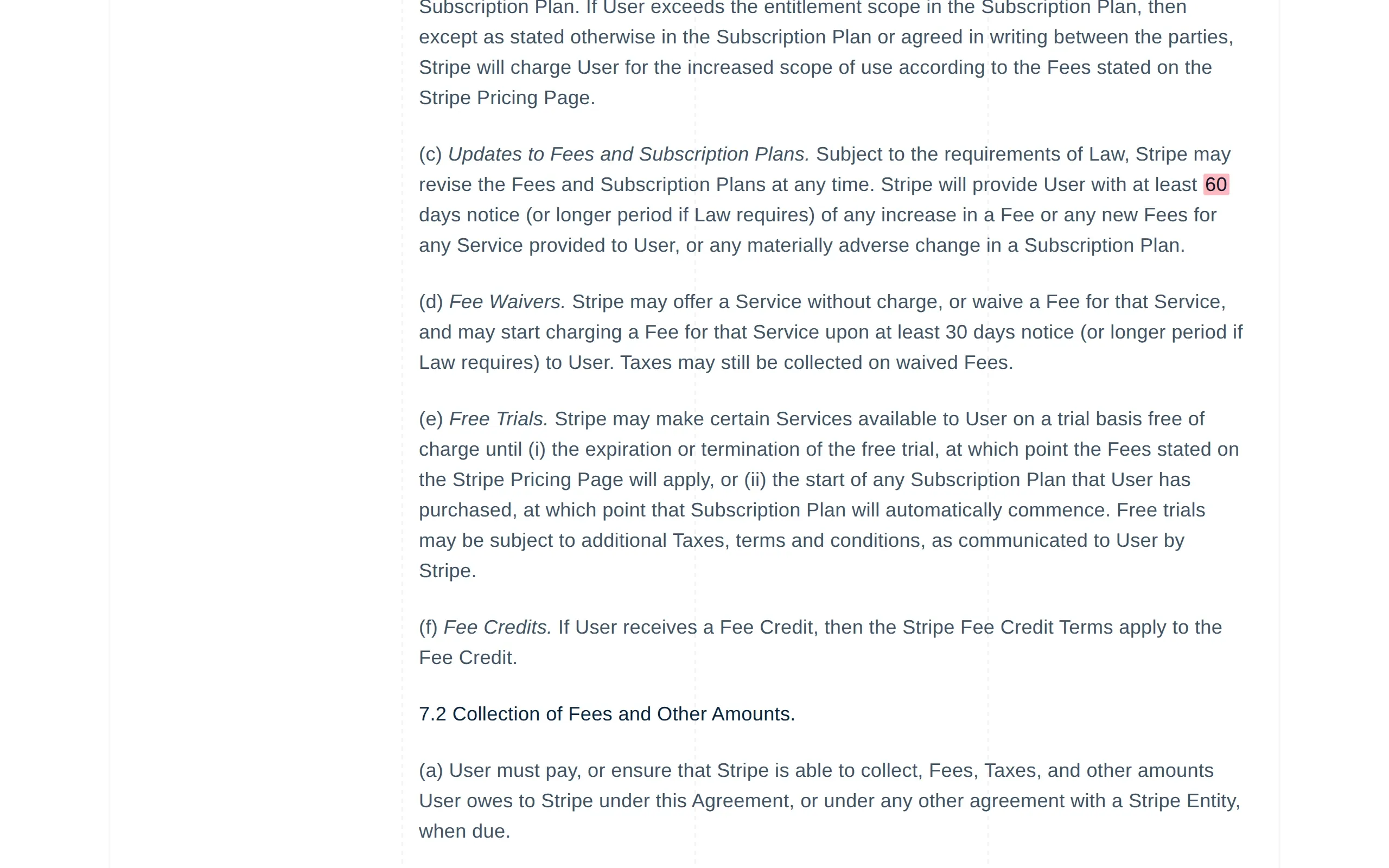
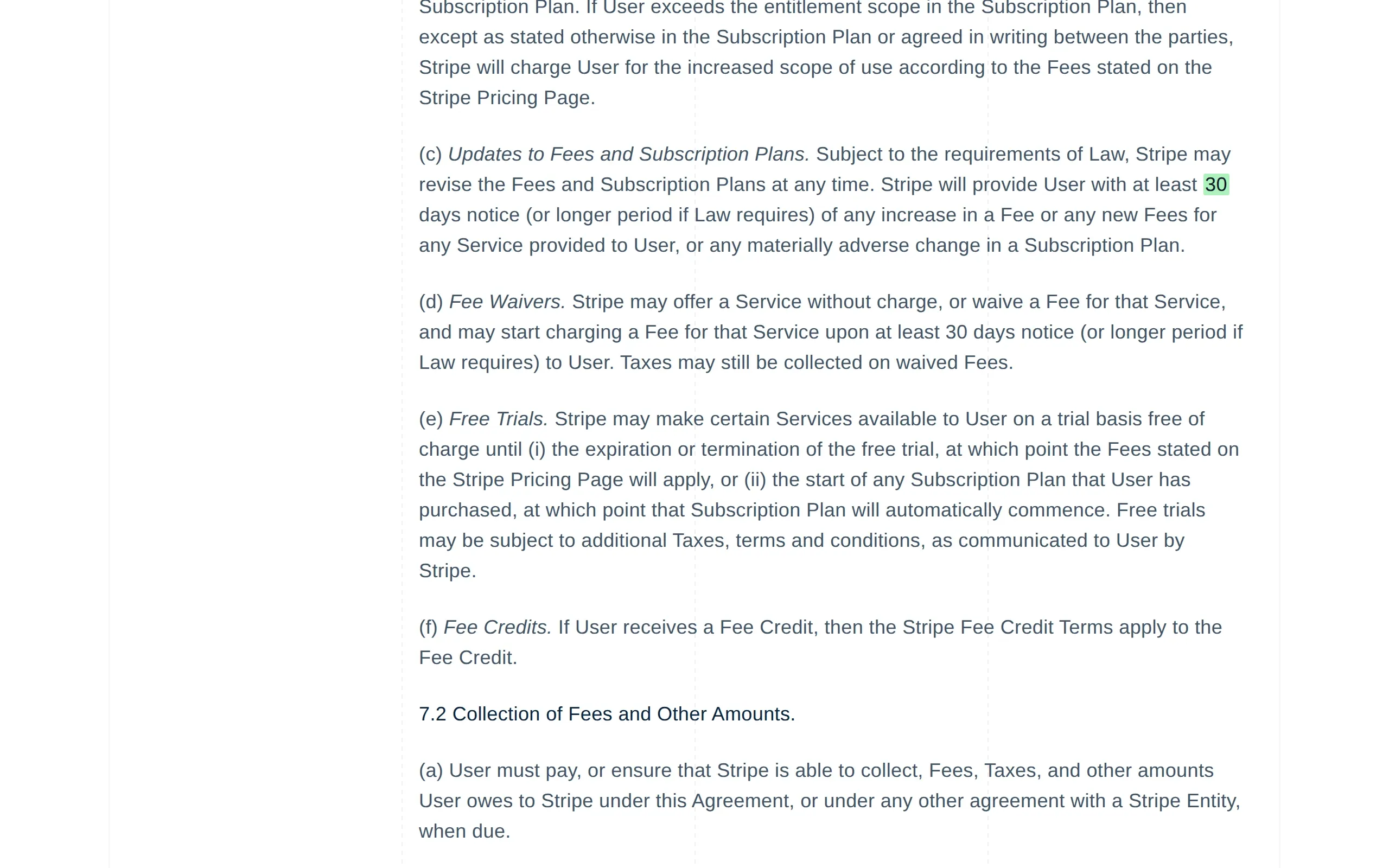
Fee-increase notice cut from 60 to 30 days.
Half the warning before a fee goes up, in an agreement few people reread.
How ChangeGuard helped
Comparison. One number changed in an agreement of about 18,000 words. The comparison found it and marked the two digits, so nobody had to reread the agreement.
AI summary. Gives the old and the new notice period and says nothing else changed, so legal can decide from the email.
Keywords. Watched for “notice” and “fee”. The clause is about fees, so it was flagged; while keywords are set, edits that mention neither stay quiet.
Rating. Likely substantial, so it opens the round-up email, ahead of minor edits on the set's other vendor terms.
stripe.com · Stripe Services Agreement
Current · Sep 20, 2026Previous · earlier version
AI summaryLikely substantial
Notice of a fee increase: at least
60 days→ 30 days
The notice Stripe gives before increasing a fee or adding a new one went from at least 60 days to at least 30 days. The rest of the agreement did not change.
Keyword: fee
The notice Stripe gives before increasing a fee or adding a new one went from at least 60 days to at least 30 days. The rest of the agreement did not change. Drag the divider to see the previous version.
Captured September 2026, as examples of public pages. See the note in the footer.
The product
Everything that needs your attention, on one screen.
Each set of pages shows how many changes are waiting, which checks failed, and what is new since you last looked. Open a change and the two versions are already side by side, and the whole queue can be worked through from the keyboard.
changeguard.app/dashboard
Sets
21 pages · 4 sets
Regulatory watch· 6 pages · checked today · next 07:00
2 reviewed4 to review
Vendor terms· 4 pages · checked today · next 07:00
3 reviewed1 to review
Vendor pricing· 4 pages · checked today · next 07:00
3 reviewed1 to review
Competitors· 7 pages · checked today · next 07:00
5 reviewed2 to review
Recent changes
View all
Sep 20 07:00
Apple AirPods Pro 2 (USB-C)
Likely substantial Competitors
Oct 16 07:00
Trade Remedies
Likely substantial Tariffs and customs
Sep 20 07:00
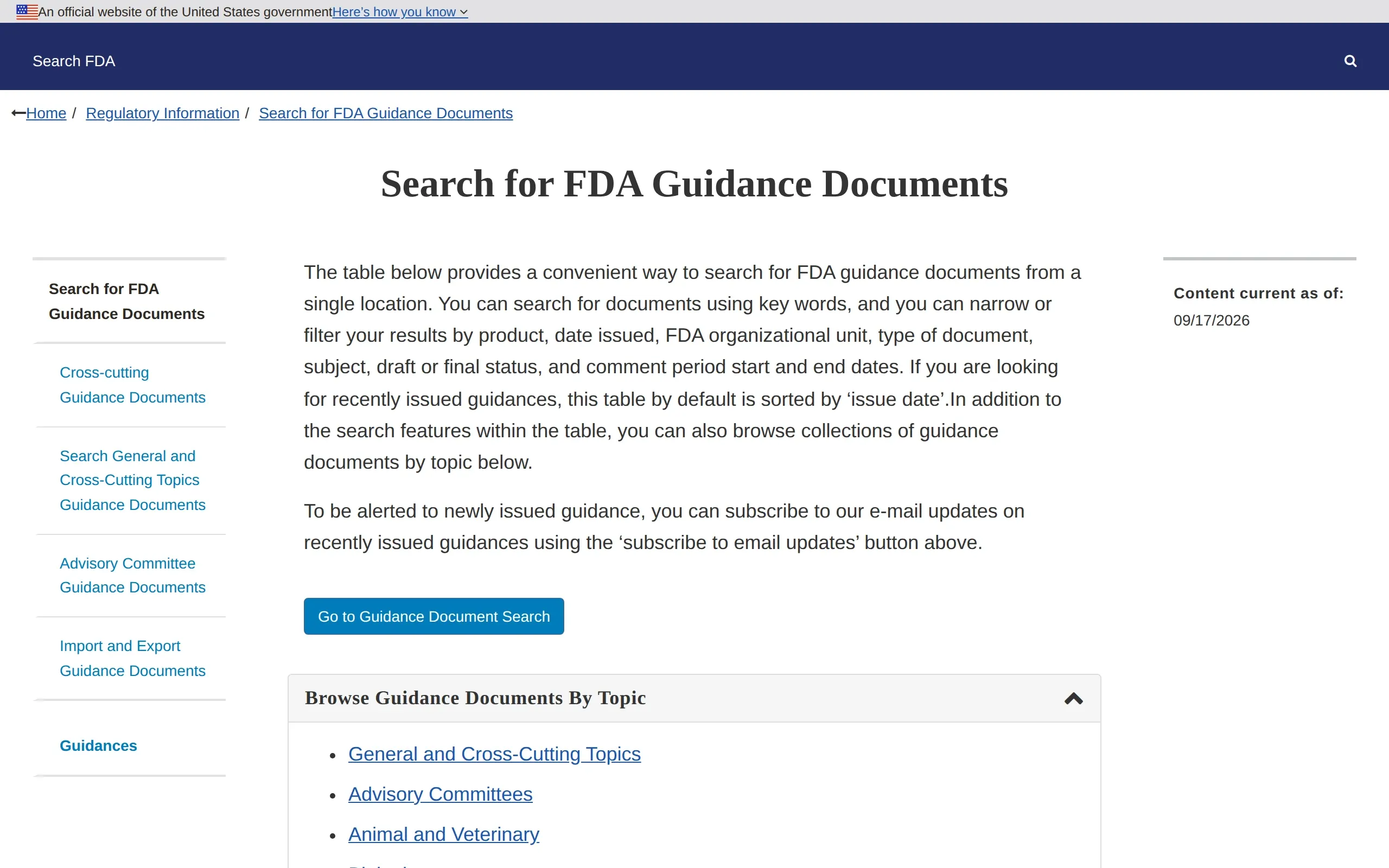
Search for FDA Guidance Documents
Likely minor Regulatory watch
Sep 20 07:00
FDA User Fee Programs
Likely substantial Regulatory watch
Ignore the parts that always change.
Cookie banners, chat widgets and footers are left out on their own. Point at anything else that never matters, then decide how big a change has to be before anyone hears about it.
Click anything on the page to leave it out: ads, dates, rotating promotions, a sidebar
Decide, per page, set or workspace, how small a change is too small to mention, and whether something disappearing counts
Per page, switch off the screenshot or the search for documents, give a slow page more time to load, or open collapsed sections before the check when the answer sits inside one
Pages added twice are spotted and merged
Element picker
target.com/p/apple-airpods-pro-2/-/A-85978622
ExcludeInclude only
Clear allSave
body›main›div.promo-carousel
Excluded · div.cookie-banner We use cookies to improve your experience.Accept
Excluded elements (1)
Cookie bannerdiv.cookie-banner
Excluded
Kept
Removed automatically
Under the pointer
Or watch for the words that matter.
Name the words or phrases a page is watched for, and it is flagged only when one of them turns up. Everything else on the page can change without a sound.
Set them on one page, a whole set or the workspace: a fee, a deadline, a product name, a competitor
A page is flagged when a term appears in text that was added, or in the name of a new document. Whole words, any capitalisation, and plurals made with -s or -es
The summary leads with the word that matched, so you know why before you open anything. An email sent for that one change names it in its subject too, unless the change is rated substantial
“Russia” now appears on the page. A new action was posted on September 18, 2026: “Expiration of Emergency With Respect to the Situation in Ethiopia; Ethiopia-related Designations Removals; Issuance of Amended Russia-related General License and Associated Frequently Asked Questions”. The rest of the list moved down one place.
+ Expiration of Emergency With Respect to the Situation in Ethiopia; Ethiopia-related Designations Removals; Issuance of Amended Russia-related General License a…
+ September 18, 2026 - Sanctions List Updates
Only flag changes that mention
Set for the Regulatory watch set. One word or phrase per line.
Russia
Iran
general license
While keywords are set, only they decide. Whole words, any capitalisation, and plurals made with -s or -es.
Every plan
A plain-English summary, before you open anything.
Each change comes with a short description in everyday words and a rating: likely minor or likely substantial. Decide what to open from the list.
What changed, in a paragraph you can read on your phone
A rating and a category, so a moved footer never outranks a new fee
Some changes are measured, not judged: text that only moved or only changed its formatting is rated minor, and a deletion is rated by how much of the page it removed. The AI that writes the summary rates the rest
Work through the list from the keyboard: next, previous, mark reviewed
changeguard.app/review
Needs reviewAll sets4 pages
USPTO fee schedule
Public records · Sep 20, 2026
Likely substantial
Apple AirPods Pro 2 (USB-C)
Competitors · Sep 20, 2026
Likely substantial
Trade Remedies
Tariffs and customs · Oct 16, 2026
Likely substantial
Search for FDA Guidance Documents
Regulatory watch · Sep 20, 2026
Likely minor
Change summary
Likely substantial Sep 20, 2026 · content
The basic filing fee for a design application rose from $280 to $300 (small entity $112 to $120, micro entity $56 to $60).
Nobody gets email they did not ask for. One person can want a message for every change; another, a single round-up on Monday morning. Every message says what happened in its subject, quotes the change in its body, and has an unsubscribe link.
A round-up as often as you like, at a time that suits you, in your own time zone. Weekly on Free, daily from Starter
An email for each change on the pages that cannot wait: 1 on Free, up to 10 on Starter, more on each plan up. And a report after a set's scheduled check, when something in it needs a look
Each email quotes the lines that arrived and the lines that went, so you can often decide without opening anything
The round-up leads with substantial changes, lists failed checks separately, and keeps quiet changes to one line
From Business up, each change, and a report when a scheduled check finds something new, can also go to a Slack or Microsoft Teams channel, or to your own systems
Daily digest — 2 changes (2 substantial) across 1 set
ChangeGuard
Daily digest
2 changes (2 substantial) across 1 set, since yesterday at 07:00.
Set
Changes
Substantial
Failed
Regulatory watch
2
2
0
Regulatory watch · 1 change (1 substantial)
Likely substantial
Recent Actions
ofac.treasury.gov/recent-actions
A new action was posted on September 18, 2026: “Expiration of Emergency With Respect to the Situation in Ethiopia; Ethiopia-related Designations Removals; Issuance of Amended Russia-related General License and Associated Frequently Asked Questions”. The rest of the list moved down one place.
+ Expiration of Emergency With Respect to the Situation in Ethiopia; Ethiopia-related Designations Removals; Issuance of Amended Russia-related General License a…
View the changeOpen in ChangeGuard
Regulatory watch · 1 change (1 substantial)
Likely substantial
Microbiology Devices; Reclassification of Hepatitis B Virus Assay Devices
The comment period on this proposed order was extended by a month: comments are now due by November 25, 2024, instead of October 25.
+ Either electronic or written comments on the proposed order must be submitted by November 25, 2024. Please see section X of this document for the proposed effe…
−Either electronic or written comments on the proposed order must be submitted by October 25, 2024. Please see section X of this document for the proposed effec…
View the changeOpen in ChangeGuard
Manage alert preferences · Unsubscribe
Digest
A single summary of everything that changed, on your schedule.
Off✓ DailyWeekly
Send at07:00· America/New_York
Instant alerts· 3 pages covered
Pages other tools give up on.
ChangeGuard reads pages with a real web browser, the way you do. It waits out “are you human?” checks, signs in where it has to, and repeats the clicks needed to reach the content.
Sites that block automated visitors are handled, and once a site has let it through, that is remembered
Save a login for a site once, and every page on that site is checked while signed in
Show it the clicks once (accept cookies, open a tab, expand a section) and it repeats them on every check
A check of a page that blocks automated visitors counts as 5 instead of 1, because it needs a full browser session.
slack.com/changelog
We use cookies
Cookies help us understand how the site is used.
AcceptSettings
Page interactions
slack.com/changelog
Working
3 steps, verified
What it does
1Go to slack.com/changelog
2Click Accept cookiesoptional
3Click Show all
Documents too.
When a page you watch links to a new PDF, Word document or Excel spreadsheet, you hear about it. New documents from all your pages appear in one list. Each one opens from the site that published it.
New PDFs, Word documents and Excel spreadsheets spotted on every check, with their titles and dates
A document re-issued under the same link is flagged when its date changes
A list of what appeared since you last looked, which you can narrow to one set
When you review a page, ignore a document for good, mark it read, or save the list of its new documents as a spreadsheet
changeguard.app/dashboard
New documents 6,664
All sets
Today
Notice of proposed rule 2026-0142 (PDF)
New document · Regulatory watch
Yesterday
Service level agreement v4.2 (PDF)
Re-issued · Vendor terms
Sep 9
Data processing addendum (Word)
New document · Vendor terms
Sep 8
Price list, autumn 2026 (Excel)
New document · Vendor pricing
Sep 4
Quarterly release notes (PDF)
New document · Competitors
Since you last looked
3new1re-issued
Built for teams that share the load.
Keep clients or departments in separate workspaces. From the Team plan up, invite as many people as you need, at no charge per person.
One owner holds the plan and invites people, with a link they can revoke; admins set things up, members review
Several workspaces on one plan share its pages, checks and people
Alert settings, and a light or dark theme, that are personal to each member
changeguard.app/workspace
Procurement
4 people
Invite
D
Dana
dana@procurement.example
Owner
M
Malik
malik@procurement.example
Admin
P
Priya
priya@procurement.example
Member
T
Tomas
tomas@procurement.example
Member
Open invites
Joins as member · single use · expires in 14 days · from DanaRevoke
Invite link
Anyone with this link joins as a member. It works once.
changeguard.app/join?token=k7Qm…Copy link
Who uses it
Anyone whose job depends on a page they do not control.
Every account starts on Free. Upgrade to Business from Plan & usage in the app.
Questions
Questions people ask before they sign up.
How do I monitor a website for changes?
Add the address of each page you want to watch, and choose how often it is checked. Each check compares the page with the version you last reviewed, marks the words that changed, sums up the change and rates how much it matters. You hear about it by email, one change at a time or in a round-up.
Can it track changes on any web page?
Almost any page you can open in a browser: an agency's notices, a vendor's terms, a price list, a competitor's product page, a page of search results, or a page behind a sign-in. The new PDF, Word and Excel documents a page links to are listed too.
Is there a free trial?
Free is the trial. Five pages, checked about once a day, with the AI summary and rating, a weekly email digest and an instant alert on one page, for as long as you like. No time limit and no card.
What counts as a page?
One URL you are monitoring. Pages you archive stop counting and can be restored later. Every page belongs to a set, which is how you schedule checks and group alerts.
How often can ChangeGuard check a page?
It depends on the plan: once a day on Free, and as often as every hour from Starter up. You set the schedule per set, from once a month up to your plan's limit, at a time that suits you. Every plan's monthly checks cover each of its pages about once a day, unless some of them block automated visitors: each look at one of those uses five checks.
What counts as a check?
One look at one page. A page that blocks automated visitors counts as five checks, because it needs a full web browser to get through.
What does a change look like?
The old and new versions of the page side by side with the differences highlighted, the two screenshots to compare, and a short summary in plain English with a rating of how much it matters. The email about it quotes the lines that arrived and the lines that went.
Which documents does ChangeGuard look for?
New PDFs, Word documents and Excel spreadsheets that a page you watch links to. Each one opens from the site that published it. A Word document or Excel spreadsheet over 100 MB is still reported when it appears, but it is too big to tell when it is re-issued.
How am I notified when a page changes?
By email. Every plan includes a round-up email (a digest), weekly on Free and daily or weekly from Starter, in your own time zone. For the pages that cannot wait there is an email per change, on one page with Free and more on each plan up, and a report after a set's scheduled check when something in it needs a look. From Business up, they can also go to Slack, Microsoft Teams or your own systems. The subject says what happened, the body quotes the change, and nobody receives email they did not opt into.
Do I have to confirm my email address?
Once, when you sign up. Alerts go only to an address that has been confirmed, so a typo can never send your reports to a stranger. If mail to your address starts bouncing, alerts pause and the app tells you.
Do you integrate with Slack or Microsoft Teams?
Yes, on the Business plan and up. Each change, and a report when a scheduled check finds something new, can go to a Slack or Microsoft Teams channel, or to your own systems by signed webhook, as well as by email. Your workspace's owner sets it up in Settings, Integrations.
Can it monitor pages behind a login?
Yes. Store a site sign-in once and every page on that site is checked signed-in. You can also record the clicks it takes to reach the content, and ChangeGuard repeats them on every check.
What about sites that block automated visitors?
ChangeGuard uses a real browser and waits out the check. Blocks from DataDome and Cloudflare are recognised and waited out; Imperva and Radware blocks are recognised and often passed on a second attempt. Once a site has let it through, that is remembered. Each check of one of these pages counts as five.
How do you handle cookie banners and rotating content?
Cookie banners, footers and chat widgets are left out on their own. For anything else, point at the parts of a page that always change and never matter and ChangeGuard ignores them. You can also set a minimum change size per page, set or workspace.
Can I watch a page for particular words?
Yes. Give a page, a set or the whole workspace a list of words or phrases, and the page is flagged only when one of them appears in new text or in the name of a new document. Whole words, any capitalisation, and plurals made with -s or -es. The summary leads with the word that matched, and so does the subject of an email sent for that one change, unless the change is rated substantial.
Who can see my workspace?
Only people the workspace's owner invites. The owner holds the plan and invites people, admins set things up, and members review changes. Free is just you; from Team up there is no limit on people.
Start watching your first five pages. Free.
An account takes a minute: email and password, no card. Add a page, run the first check, then choose how often its set is checked.